
Reliable Linked Issue Reporting on Jira Cloud
This use case story takes us back to eazyBI Community Days 2025, where Juan José Marchal from MyCloudDoor shared this practical, real-world example of what happens when long-established Jira Data Center solutions meet the realities of Jira Cloud – and how eazyBI can step in to fill the gaps.
The case study comes from the context of a financial institution – over 1,000 Jira users, nearly 200 projects, and a Data Center instance full of various apps and customizations. During migration assessment, the team repeatedly found plugins that could be replaced with built-in Jira features or with add-ons that can cover more business requirements / to provide a wider solution. By the time they were ready to migrate to the Cloud, they were down to only four apps – including eazyBI.
The story begins in late 2021, when Juan José was assigned to prepare a migration from Jira Data Center to Jira Cloud. A few months into the migration work, management began requesting project overviews, KPIs, and dashboards – everything you’d expect from a large organization preparing for change.
That’s when he introduced eazyBI, which became part of their journey starting in February 2022, right as the migration planning intensified.
Showing Linked Issue Information Reliably on Jira Cloud
After the migration, the team entered the “transformation” phase: adapting workflows, cleaning up configurations, and navigating Cloud limitations. One topic quickly surfaced – how to display linked issue information, especially across projects.
Deployment teams needed to see key Quality Assurance (QA) fields while preparing releases.
The structure was straightforward:
- Project A: QA
- Project B: CI/CD
- Issues connected via the link: deploys / is deployed by
- Deployment teams needed to see the QA status of linked issues while filtering and planning Project B data without opening individual issues.
How It Worked on Data Center
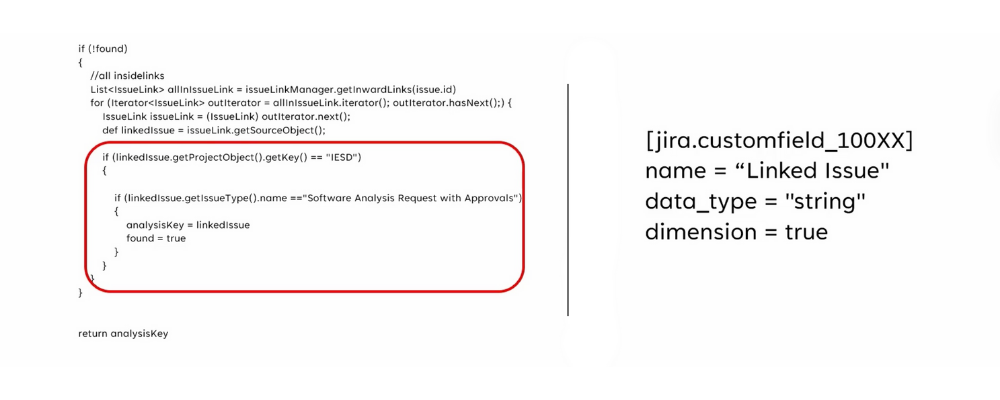
On the Data Center, their solution worked smoothly:
- A scripted custom field (from a third-party app) iterated through linked issues and returned the QA status
- This field was imported into eazyBI as a custom field
- No extra calculations required; everything was reliable
 What Went Wrong on Cloud?
After migrating to the Cloud, the script still existed, but the values were wrong.
Why?
In Jira Cloud, scripted fields only update when the issue is opened.
So when users relied on filters or dashboards, the values remained outdated.
For example:
- QA issue status: Selected for Development
- Scripted field in the CI/CD issue: Backlog
- Root cause: the CI/CD issue had never been opened to trigger an update.
This led to confusion and inaccurate deployment planning.
At this point, the team asked the critical question: Do users truly need this data inside the Jira issue? And the answer was no. They needed accurate data in a report, especially for their weekly deployment meetings. This shifted the approach entirely.
New Solution: Delegate the Logic to eazyBI
Instead of relying on a scripted field with inconsistent result in time, the team moved the logic to eazyBI itself:
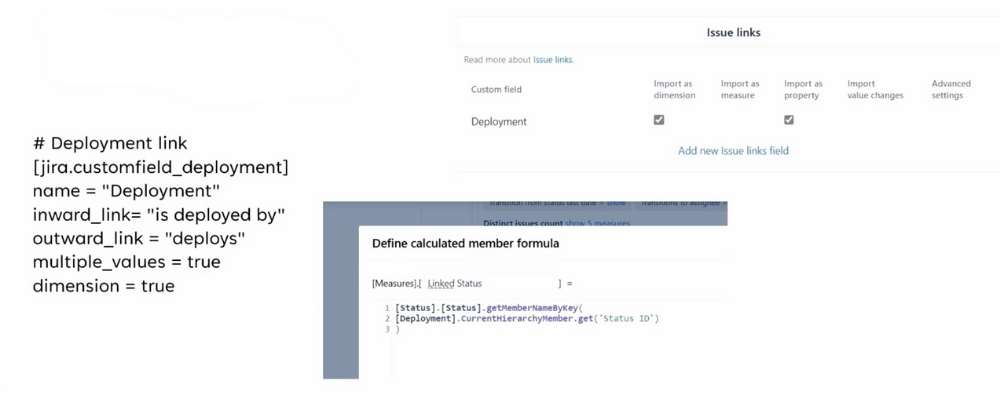
- Use the issue links import option in the eazyBI import settings
- Let eazyBI read the actual linked issue statuses directly from Jira
- Create simple calculated measures to display human-readable status names
- Build a clean, accurate deployment readiness report
This bypassed the Cloud limitation and ensured reliability.
In this scenario, eazyBI was more real-time than Jira, because imports always pulled the newest status, even when the scripted fields in Jira did not.
Lessons Learned
- The best solution may require rethinking your approach.
Trying to fix the scripted field wasn’t necessary; the real need was accurate reporting, not in-issue data. - eazyBI is more than a reporting tool.
It can process, transform, and calculate data using:
- issue links,
- custom calculations,
- and dynamic measures. - When in doubt, ask eazyBI support.
If something can be done, they’ll help you find the best path within Cloud’s constraints.
Final Thoughts
Cloud migrations often reveal hidden dependencies or behaviors that once worked flawlessly in the Data Center but might create small – yet critical – gaps in the Cloud. This case shows how rethinking the approach and shifting the logic can lead to a simpler, cleaner, and more reliable solution.
Watch the full presentation video recording here.