
If AI Can Build Any Report, Why Keep a Dashboard?
AI can build any report in seconds, do we still need dashboards?
Customers ask us this almost every time we meet. Our answer is yes. Here’s why, plus four Jira reporting dashboards from our demo account that you can copy into your own.
What a Dashboard Gives You That a Prompt Doesn't
Everyone Measures the Same Way
Ask an AI to build the same analysis twice, and it may interpret the question slightly differently. Each time, it decides which measures, filters, and periods to use, so you can get two different answers.
A dashboard is built once, around what your team agreed to measure: what counts as done, which issues are urgent, which periods to compare. It answers the same way every time.
That doesn't mean you should stop asking AI. It's really good for one-off questions. But for the things you need to agree on as a team and check every week, a dashboard gives you answers you can compare over time.
Dashboards are also easier to share. Put one on a monitor in the office, publish it in Jira or Confluence, or simply send it by email. Everyone starts from the same place.
A Dashboard Gives Broader Context
Put several reports together on a dashboard, and you can tell a story with your data. You build a dashboard around your questions.
Start with reports that show the overall situation, then add more detailed ones that explain what's behind the numbers. Main project KPIs like total, open, and resolved work, then a list of urgent tasks and velocity over time, and you see where the project stands.
You Notice When Something's Off
When you look at the same reports in the same place regularly, you know what to expect. If something suddenly looks different, you notice it.
A cell turns a different color than usual or a slope in a chart changes shape, and you notice it immediately. It’s like the dashboard in your car: you may not know what every gauge means, but you notice right away when something is wrong.
It Saves Time and Tokens
Every time you ask AI to build a report from scratch, it has to work out the data, the measures, and the filters again, and you pay for that in time and tokens. A dashboard is built once, so you don't spend resources each time you open it, no matter how many people look at it.
Your Team Uses It, and So Do Your Agents
While eazyBI's own AI assistants help you build and fine-tune reports faster, the eazyBI CLI comes with an agent skill that lets AI agents work with your eazyBI data. Ask your agent to explore what's in your reports, dig deeper into the numbers behind a chart, or export a dashboard as a PDF and turn it into slides for your next review. Because the agent starts from the reports your team already trusts, the numbers stay consistent. So a well-built dashboard pays off twice.
Four Dashboards for Jira Reporting
If you're looking for dashboard ideas, we've put together a collection of demo dashboards you can explore and use as inspiration. They're available to anyone, no login needed.
Open Jira Issues
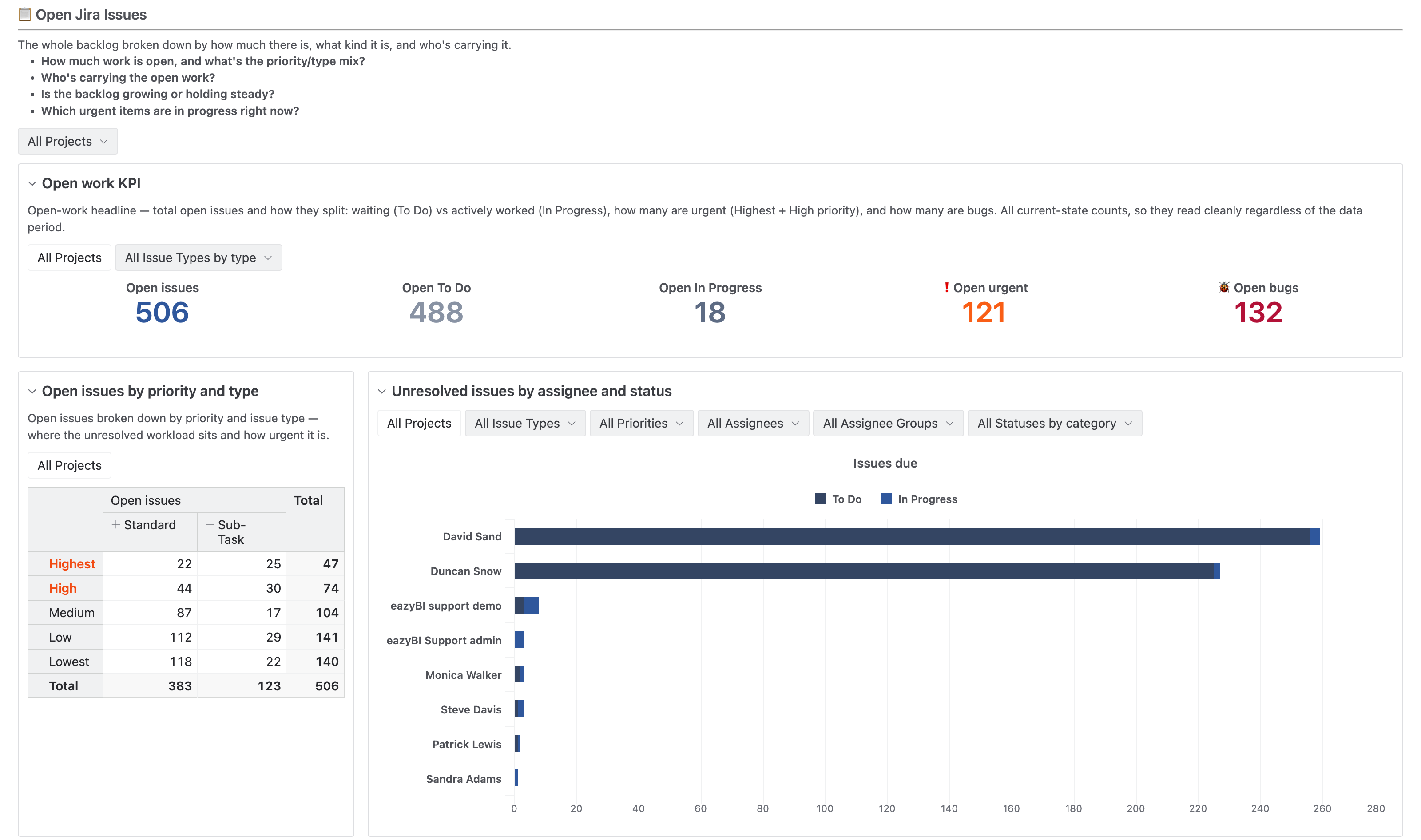
Is our project's workload under control?
Five numbers on top give the first answer: open issues in total, count of issues in To Do and In Progress statuses, urgent tasks, and bugs.
Below, the same open work is split by priority and type, by assignee, and by month, and at the bottom is a list of issues in progress with links to Jira.
Pick a project in the filter at the top, and every report switches to it.
The total alone looks manageable, but in the demo data, the assignee chart shows two people holding almost all the open work.
Sprint Health
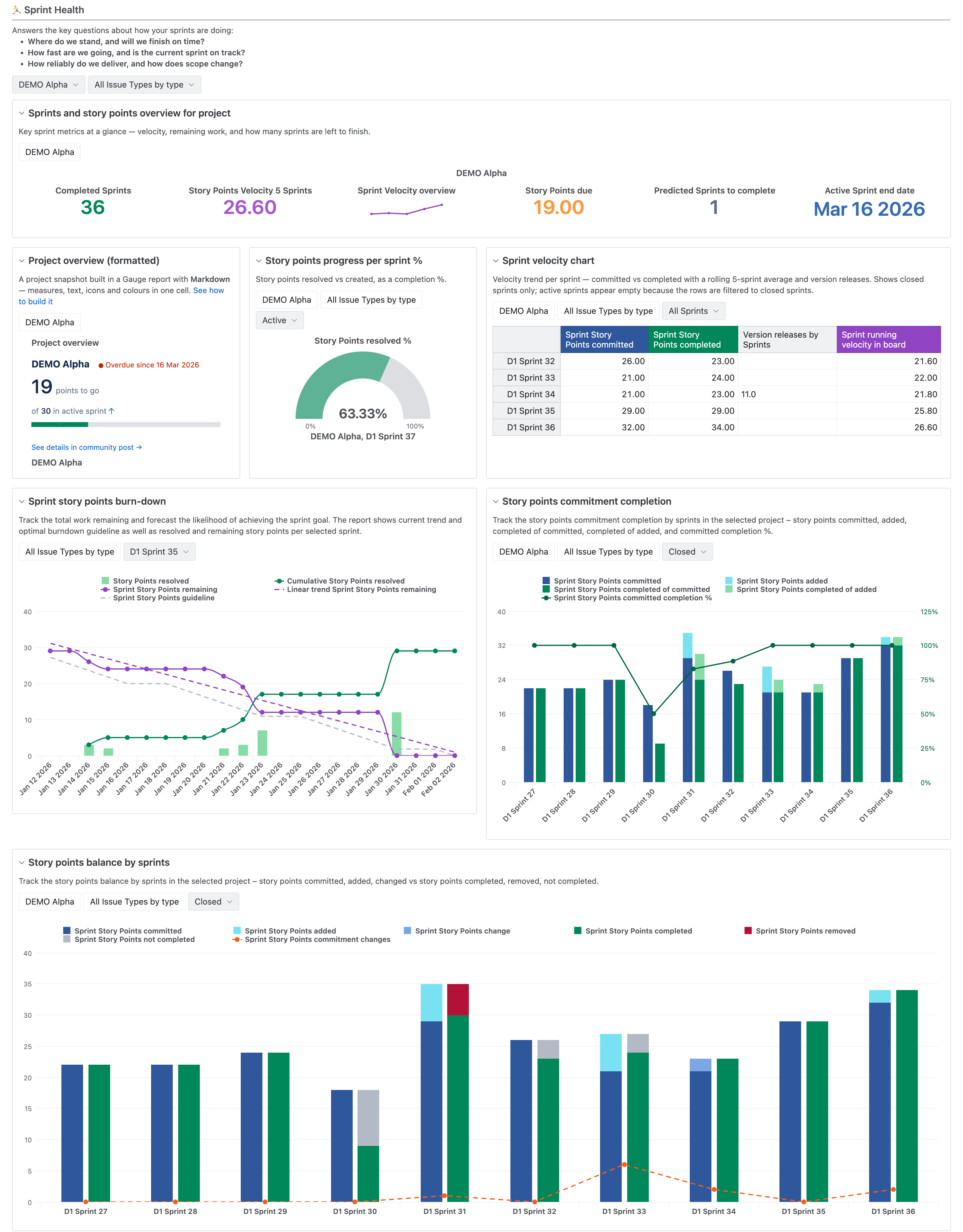
Open this one at every sprint review, when the question is: Will the team deliver what it promised?
The top row shows where the project stands, including velocity, story points still due, and how many sprints are left at the current pace.
Below are the sprint's burn-down and a look back at past sprints.
In the story point balance chart, the team usually finishes close to 100% of what it commits to, except once, when it drops to about half. After a few reviews, you know what a normal sprint looks like for your team, so a sprint like that is hard to miss.
Throughput
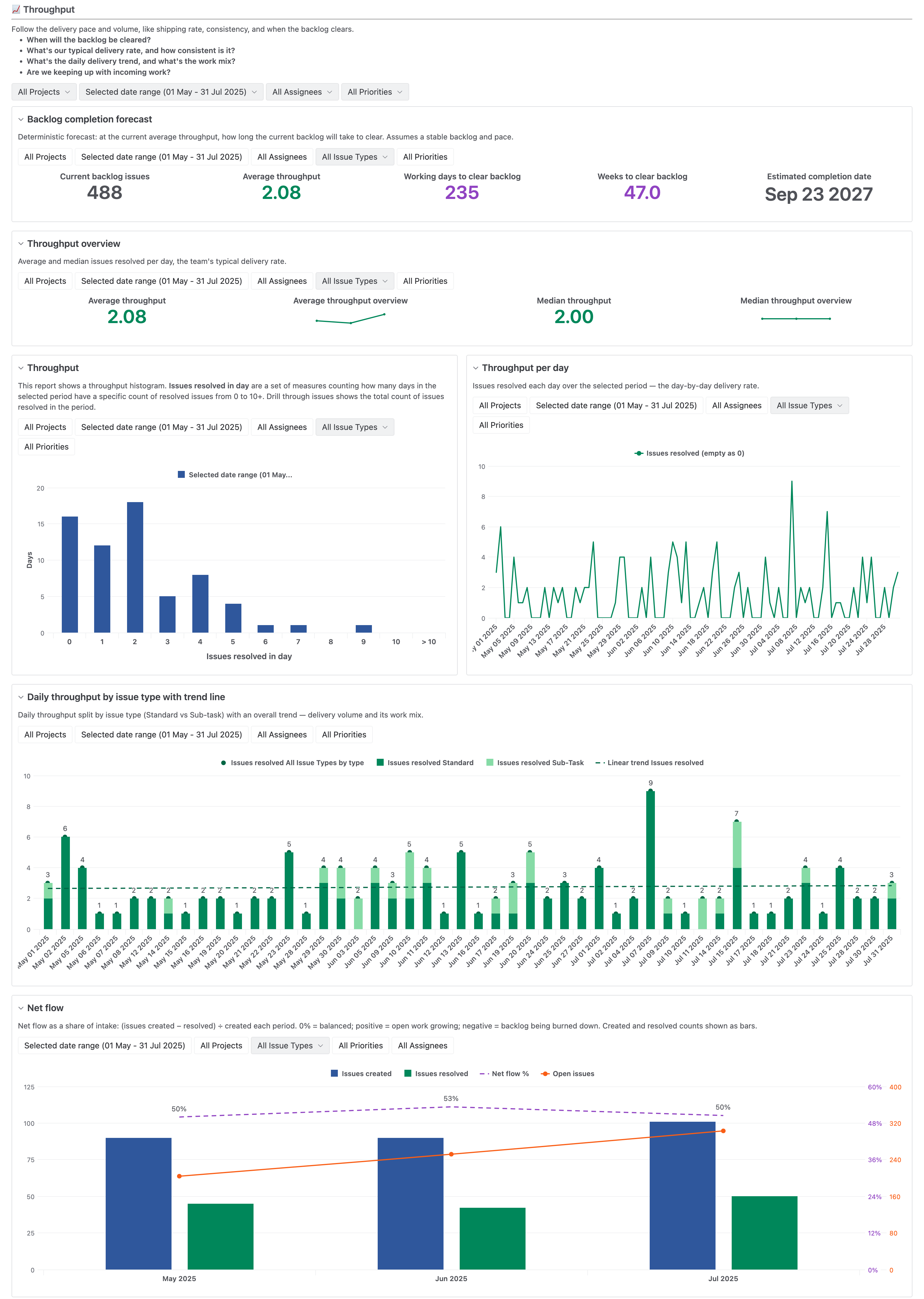
The top row answers one question: When will the backlog be cleared?
It divides the open backlog by the average number of issues resolved per day and gives you a forecasted project end date.
The rest of the dashboard checks whether that date holds up. Average and median throughput are almost the same, about two issues a day, so a few busy days aren't inflating the pace.
On its own, the forecast looks perfectly reasonable. But the net flow chart at the bottom shows roughly twice as many issues created as resolved each month, so the backlog is growing and the project end date will keep moving.
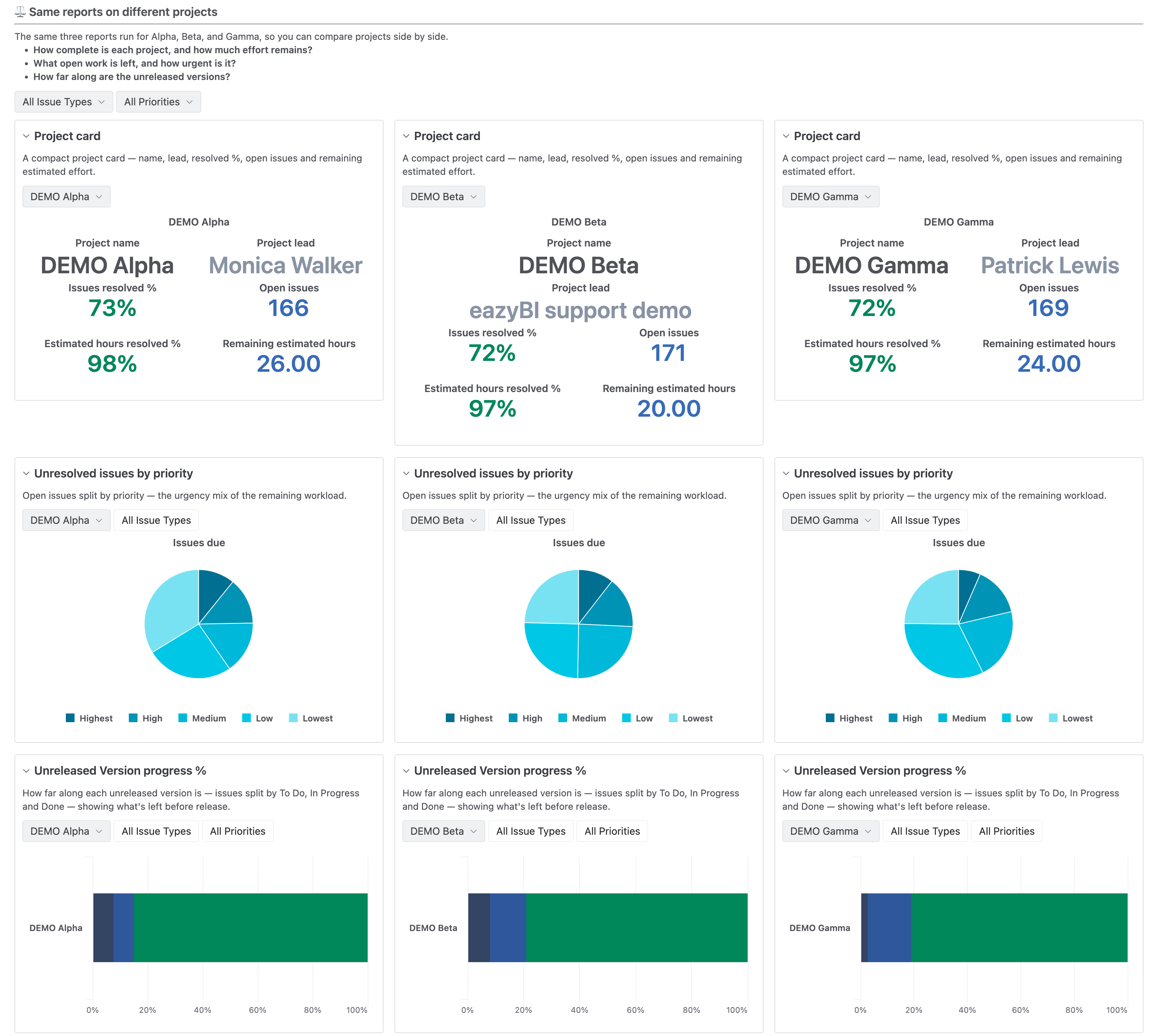
Projects: Alpha | Beta | Gamma
Which project needs attention first?
Three reports are added to this dashboard three times each: a project card, open issues by priority, and unreleased version progress.
Each copy has a different project selected in its filter, so every project is measured the same way and the projects line up in columns. Read across a row to see which one is furthest from done, has the most urgent open work, or has a version falling behind.
In the demo, the three are almost even, each about 72% resolved with around 170 open issues, so if one starts to slip, it will stand out right away. All nine widgets come from the same three reports, so if you edit one report, all three columns change with it.
Want to Get These Dashboards for Yourself?
Open any report, export its definition, and import it into your own account. The page filters come along set to demo projects, sprints, and dates, so switch them to your own. To learn step by step, try the Learning Center dashboard: each report names the course lesson that teaches it.
Looking for chart and formatting ideas instead? Browse Getting Started, Advanced Charts, and Custom Formatting demo dashboards!
Your Turn
So, if AI can build any report, why keep a dashboard?
Because a dashboard is your team's agreement on what to measure and how, and it tells a broader story than a single KPI. Because you know the view by heart, your eye catches something that's off before you even go looking. And because it's built once, you don't spend time and tokens every time you check the same numbers, and your AI agents can use already calculated data.
If you find yourself opening the same set of reports every week, try putting them on a dashboard. Start with three or four questions, borrow a few reports from our demo account, and see your own numbers side by side.
Find detailed information on how to build dashboards in the eazyBI documentation.