
How We Measure Our Support, and How You Can Too
Does a support team need to grow as fast as the customer base? Our own reports say: not anymore. Since we launched two AI assistants in eazyBI in autumn 2025, technical support conversations have dropped.
We can see this because we have been analyzing our own Help Scout data in eazyBI for several years. Recently, we turned that setup into a Help Scout custom source app that anyone can install from the eazyBI Marketplace.
What We Look at in Support Reports
We don't track everything. People tend to improve whatever is being measured, so we choose carefully what to measure and what not to measure. Most of the time, we come back to four questions.
For each question, you'll see a report from our own dashboards and, where there is one, the matching sample report you get with the Help Scout source app.
In all the report examples below, we have changed the numbers, but the reports and trends are real.
1. How Fast Do We Answer?
We check how many conversations get a first reply within our agreed SLA time (one working day), and we count that time in working hours. A message that arrives on Friday evening and gets an answer on Monday morning is fine, while a message that waits more than a working day is not.
We chose this as our main metric because it is what we promise our customers in our SLA. We look at it in every meeting and analyze the possible causes of any change.
Average First Response Time (Office Hours)
Our first dashboard starts with the simple average first response time in office hours. An average is not the most precise measure and does not show causes, but it answers the main question: do we keep our promise?
Comparing it with the same period a year ago tells us whether we still provide the same level of support as before. Comparing with the previous nine weeks shows early signs of more lasting changes.
Our latest results show a clear trend: we answer faster. The reason is the answer to the second question below.

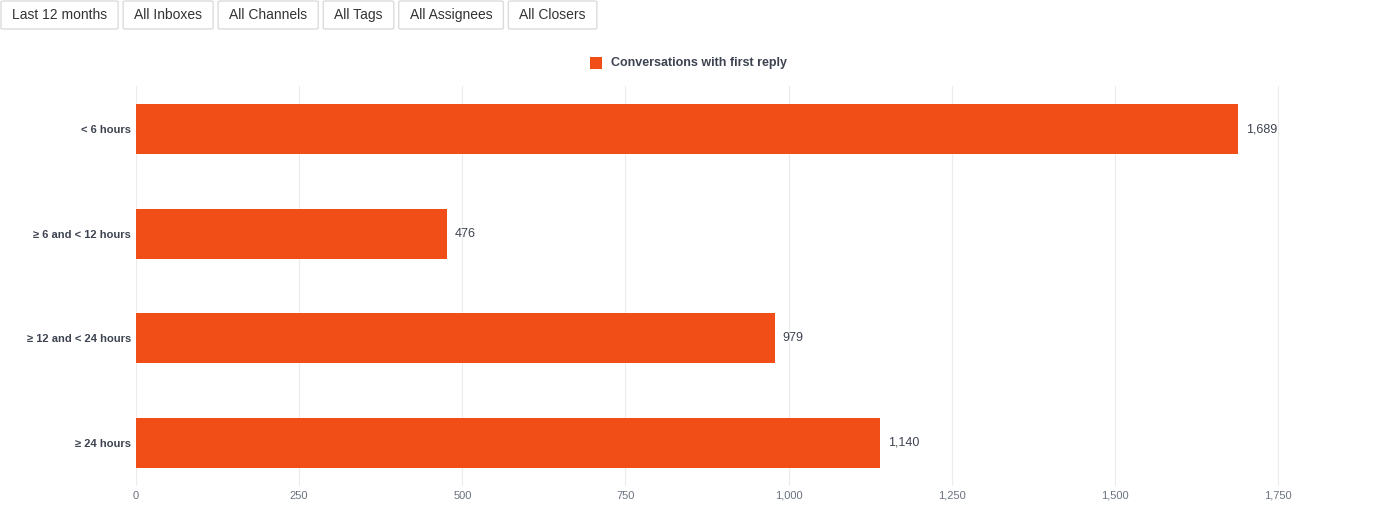
Sample Report: First Reply Time Distribution
Showing first reply time as intervals instead of averages lets you check whether most tickets are answered within an acceptable time and take a closer look at the outliers. When the support inbox is the first point of contact, different inquiries can be answered at a different pace.
This is a sample report you get out of the box with the Help Scout source app. It counts calendar hours, so weekend messages land in the ≥ 24 hours group.
With Use office hours turned on, the app also adds office-hours intervals, so you can build the working-hours version we use.
2. Is the Support Volume Going Up or Down, and Why?
Support volume changes over time. A growing customer base brings more conversations, while new features that solve complex issues and self-help tools bring the number down. Reporting helps answer two questions: do you need to grow the support team, and which changes in the product or processes affected the support volume?
The latest reports show that we don't need to grow the support team at the same pace as the customer base, because eazyBI AI assistants help customers move forward on their own.
Conversation Dynamics — Week Comparison
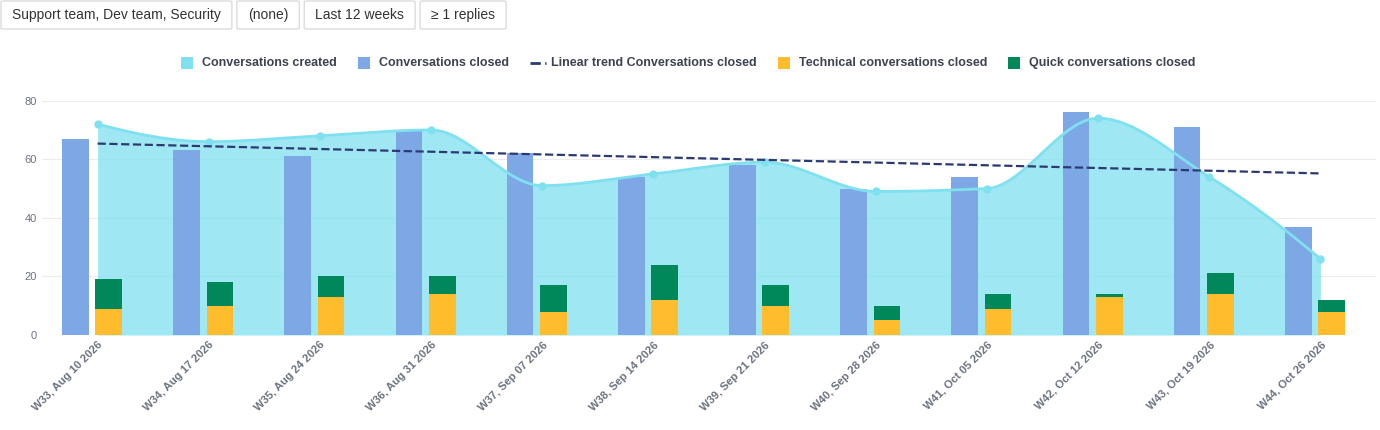
The weekly timeline shows created and closed conversations, with the technical and quick ones next to them.
We look most closely at the linear trend line, which shows the overall trend of closed tickets. The bars for technical and quick tickets (based on tags, see question 4) show what the tickets are about.
Looking at this report over the years, we noticed two main changes. First, after we launched eazyBI AI assistants, our support queue started to trend downward: we receive and close fewer tickets.
Second, as most of our customers have moved to Jira Cloud, there are fewer technical tickets.
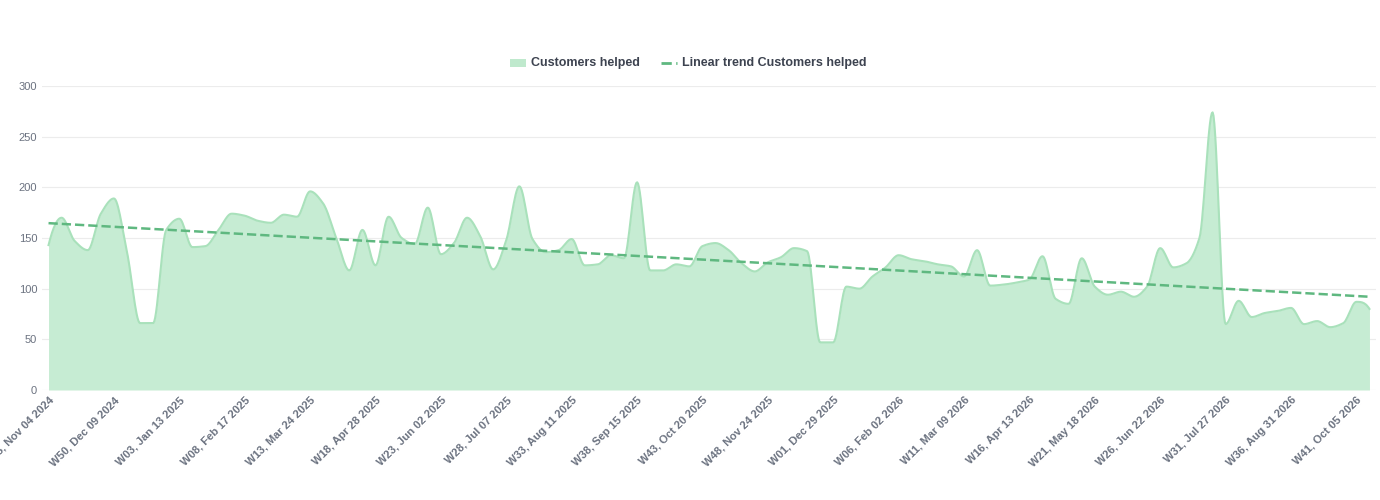
Count of Customers Helped by eazyBI Team
Support volume can also be measured by the number of customers we have helped over time. The linear trend makes it easy to read.
This view shows the same thing: the number of unique people asking for support decreases, while the total number of eazyBI users grows (we see that in our sales reports).
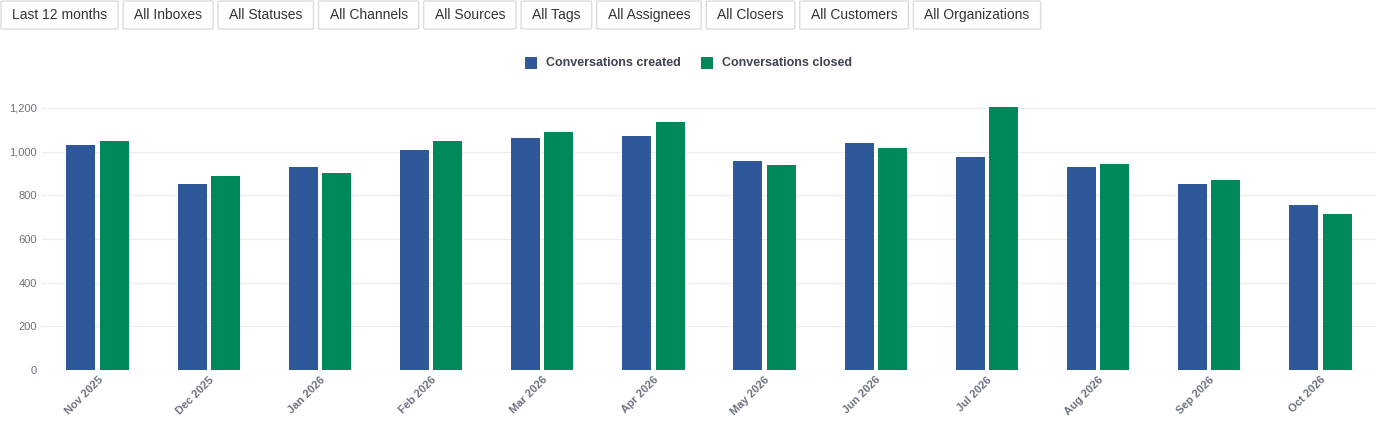
Sample Report: Created and Closed Conversations over Time
The sample report puts new and closed conversations side by side, month by month. If the closed bar keeps falling behind the new one, the backlog is growing.
3. When Does the Queue Pile Up?
Support load is not even. There are Atlassian Team event weeks when half of the support team is not in the queue. And there are long holidays, like Christmas or Midsummer, which is a big thing in Latvia.
When we know the typical busy and slow periods in the support queue, it is easier to plan other activities, like partner events, webinars, or vacations. It also helps explain sudden peaks, because they usually happen around releases.
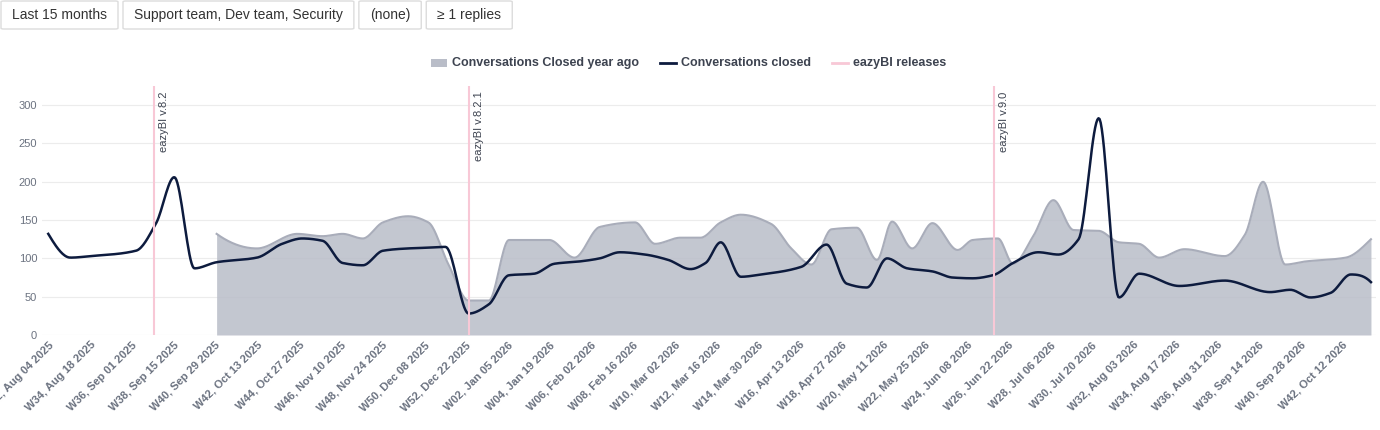
Closed Conversations
This timeline shows closed conversations week by week, next to the same week a year ago. Peaks and dips that line up in both years show the typical busy and calm periods. It also clearly shows what the trend lines in the previous reports indicated: fewer support tickets this year.
We also added markers for eazyBI releases, which usually bring more conversations. The markers are calculated members in our account. In other reports, we use markers for holidays and big events.
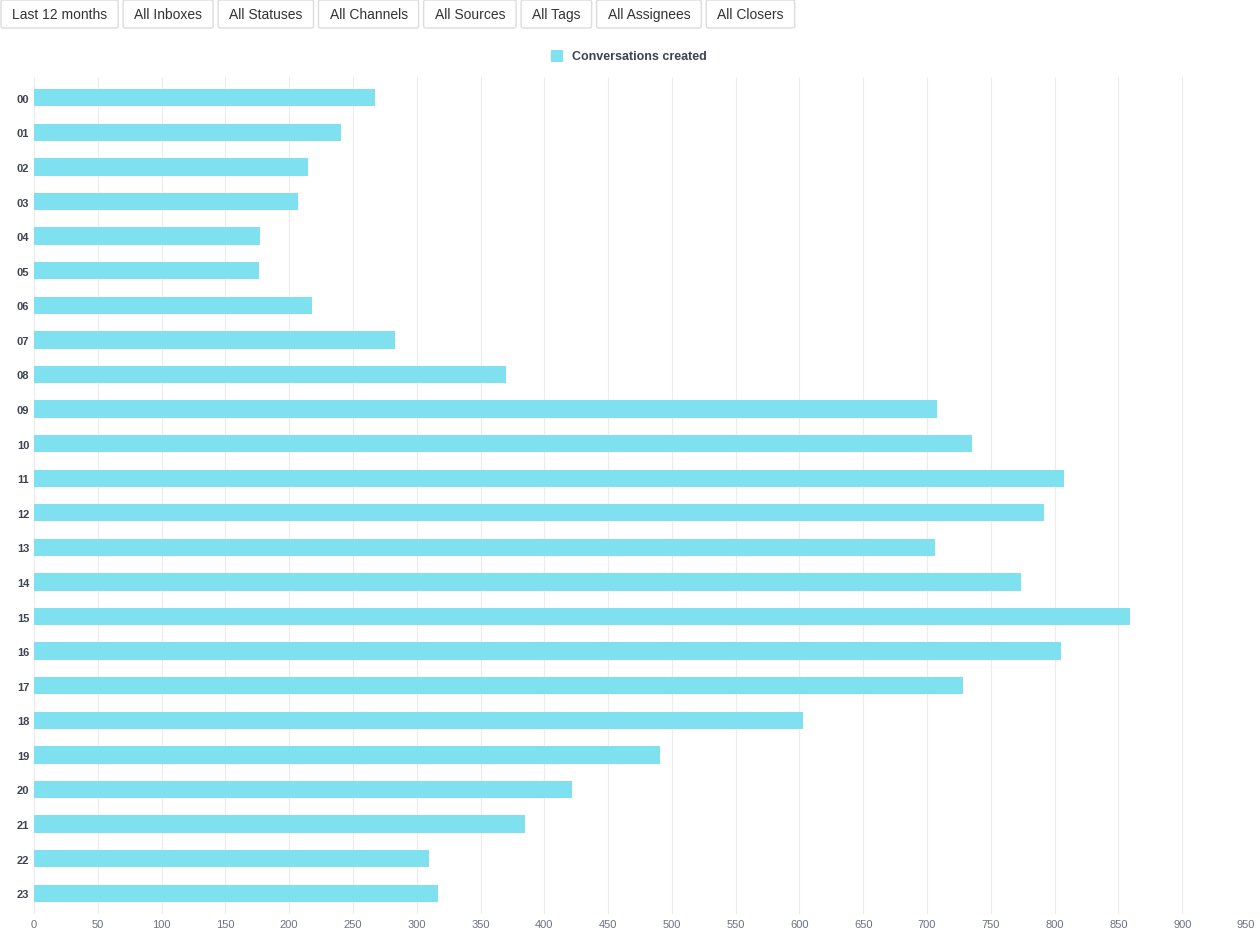
Sample Report: Busiest Time of Day
A sample report uses the same approach on a smaller scale: it shows new conversations by hour, so you can see the busiest hours of the day. This is especially useful if you work with customers worldwide and activity goes around the clock.
4. What Kind of Questions Do We Get?
In Help Scout, we use tags to sort tickets by how they should be handled and who has the right skills to handle them.
For example, quick means the answer will be a link to the documentation or a piece of general information, and urgent is self-explanatory. The technical and security tags ask the developer on support duty or the security officer to take a look at the ticket.
We use tags daily, and later we analyze tickets by tags to see how the topics of support conversations change and to plan support work.
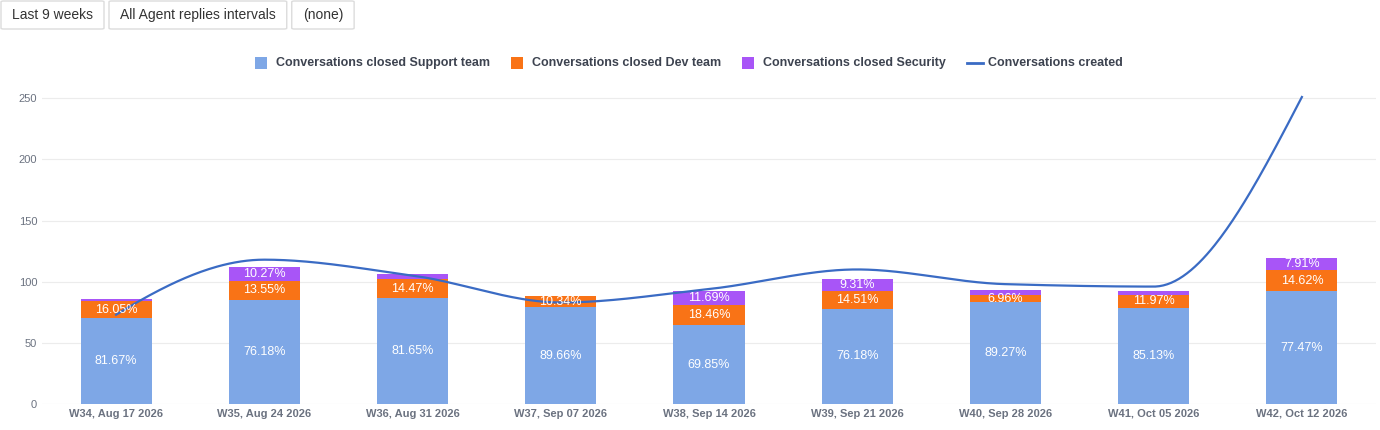
Conversation Split by Teams, %
We also use tags to show which team was involved in closing conversations, splitting tickets between the support, developer, and security teams.
It helps us understand whether we still need two developers on weekly support duty, or whether the security officer needs some help.
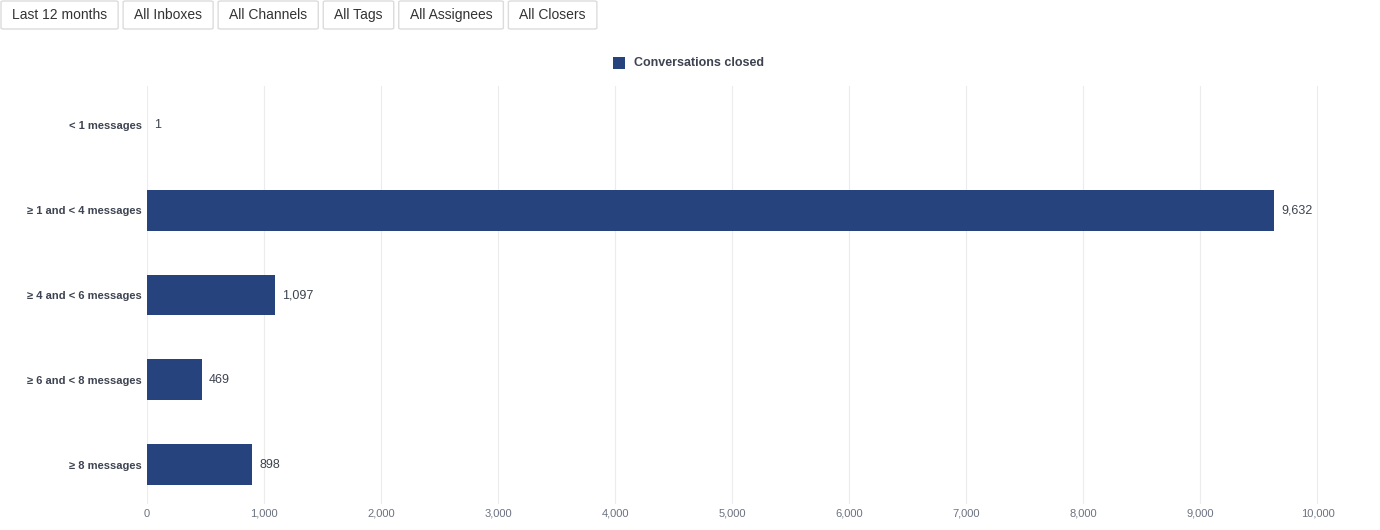
Sample Report: Closed Conversations by Message Count and Tag
Asynchronous communication is worth measuring not only by duration, but also by the number of back-and-forth messages. Using an interval dimension based on the message count per thread, we look at the typical length of conversations.
When we combine this with tag filters, we can see that the long tail of eight or more messages is usually technical conversations. They need more collaboration with the customer's admin, along with thorough troubleshooting and testing.
A Few Things We Learned along the Way
In our own account, we have about sixty reports on ten dashboards. They all use the data the app imports, plus a few calculated members we created ourselves.
Count Only Real Conversations
Not everything in a support inbox is a customer question. There are workflow messages, community notifications, Marketplace feedback, and so on. We mark real customer conversations with a Help Scout custom field and filter by it in every report. The Help Scout source app lets you analyze custom fields, so you can do the same.
Look at Ranges and Relative Numbers, Not Only Counts
If you need to plan the support team by skills, it is worth looking at relative numbers, not only absolute ones. For example, “technical conversations were 10% of all closed conversations, down from 20%” might mean that only one developer needs to be on regular support duty instead of two in a ten-person support team.
Compare with the Previous Period
Most of our reports compare the last nine weeks with the weeks before and with the same period a year ago. That is long enough to smooth out one unusual week, and short enough to notice a change and act on it.
Don't Rank People
We choose not to measure each team member separately. We treat support as the whole team's responsibility rather than solo heroics, so our reporting shows that view.
The sample reports include Replies by agent, which shows the numbers per team member, if your support approach needs them.
What You Get with the Help Scout Source App
An AI agent built most of the Help Scout app with the eazyBI custom sources skill: the connection, the data model, the import, and the sample reports. Here is what the app does for you.
- You authorize the connection once with a Help Scout App ID and App Secret, and eazyBI refreshes the access tokens.
- Incremental data import. Each import re-imports only the conversations that changed since the last import. Conversations that fail are reported as warnings and retried next time, not skipped.
- Working hours are built in. Turn on Use office hours, set your team's days and hours, and the first reply, response, and closing times are counted in working hours only.
- The numbers match Help Scout's settings. First reply, response time, resolved conversations, and the happiness score follow Help Scout's own definitions.
- Custom fields are included in reporting. Pick the Help Scout custom fields you need, and they become dimensions, properties, or measures in the cube.
- Built-in sample reports. The first import creates a folder of sample reports and an overview dashboard. You have seen several of them above.
How to Get the Help Scout Source App for Your Support Analysis
The Help Scout app is in the eazyBI Marketplace, currently available for eazyBI Cloud, eazyBI for Jira Cloud, and eazyBI Private.
- In your eazyBI account, open the Custom source apps page.
- Choose Install from Marketplace, find Help Scout, and click Install.
- In Help Scout, create an App ID and App Secret under Your Profile > My apps, and paste them into eazyBI.
- Run the first import. The app starts as a draft that only account owners and admins can see, so you can check the data before you make it available to everyone.
The custom source apps documentation has all the details.
What If Your Support Runs on a Different Tool?
First, check the eazyBI integrations and the eazyBI Marketplace. Zendesk and Freshdesk already have their own imports, and Jira Service Management data comes in with eazyBI for Jira.
If your tool isn't there yet, you can build your own app, the same way we built the Help Scout one:
- Give an AI coding agent the eazyBI custom sources skill.
- Point it to your tool's API and give it an access token.
- Let the agent write the connection, the data model, the import, and the sample reports.
- Install the result in your eazyBI account. It starts as a draft, so you can test it before anyone else sees it.
The Help Scout source app is a good example to start from, and support@eazybi.com is always a good way to get our guidance!