
AI-Powered Reporting with eazyBI
In the past few years, the conversation around AI in business has shifted from whether we should use it to how we can use it effectively. Even before eazyBI AI Assistants were introduced, our customers and partners explored, experimented, and found practical value of AI for everyday work with eazyBI.
During eazyBI Community Days 2025, Mindaugas from TeamBit shared his journey of finding new ways to speed up and simplify his reporting with eazyBI using AI.
Mindaugas has been working as a Jira admin for seven years, and has the advantage of having eazyBI in the app portfolio. One of his responsibilities is to help users create reports and answer their questions. For many users, building complex calculation formulas in eazyBI has always been one of the most challenging parts of the job, especially without a technical background. But AI tools are changing that.
From Skepticism to Superpower
When ChatGPT first launched, it was tempting, but far from perfect. It often invented functions that didn’t exist, especially when trying to write MDX (Multi-Dimensional Expressions) calculations. At first, it felt like more of a toy than a tool.
Things started to shift with Bing AI and eventually ChatGPT-4. Once paid access became available, unlocking better reliability and longer context, everything changed. With paid access, better reliability and longer context were achieved. Creating a custom GPT became a game-changer, especially one trained to understand eazyBI's MDX syntax and documentation
Suddenly, Mindaugas had a reliable partner to debug errors, write code snippets, or just explain what a report was doing.
What Assistants Can Do
AI tools like the eazyBI AI assistants and custom GPTs can support your reporting work in a variety of ways:
- Create simple reports using standard dimensions, measures, and filters.
- Explain reports - create descriptions and clarify how filters or measures work.
- Draft or review MDX formulas, JavaScript snippets, and advanced settings.
- Get tips on optimizing reports, like offloading logic to Jira fields.
- Use assistants as brainstorming partners to explore different approaches.
Debugging Together
When eazyBI AI Assistants were introduced, Mindaugas decided to compare both of the AI tools – his custom GPT for MDX calculations and then the just-released AI Assistant. Most of the requests I get revolve around MDX formulas. Take a seemingly simple question like: “How many issues were reopened at least once?” His custom GPT assumed he was interested in tracking transitions to a specific “Reopened” status. Meanwhile, the eazyBI Assistant interpreted it as a status category change. Both missed what he actually needed.
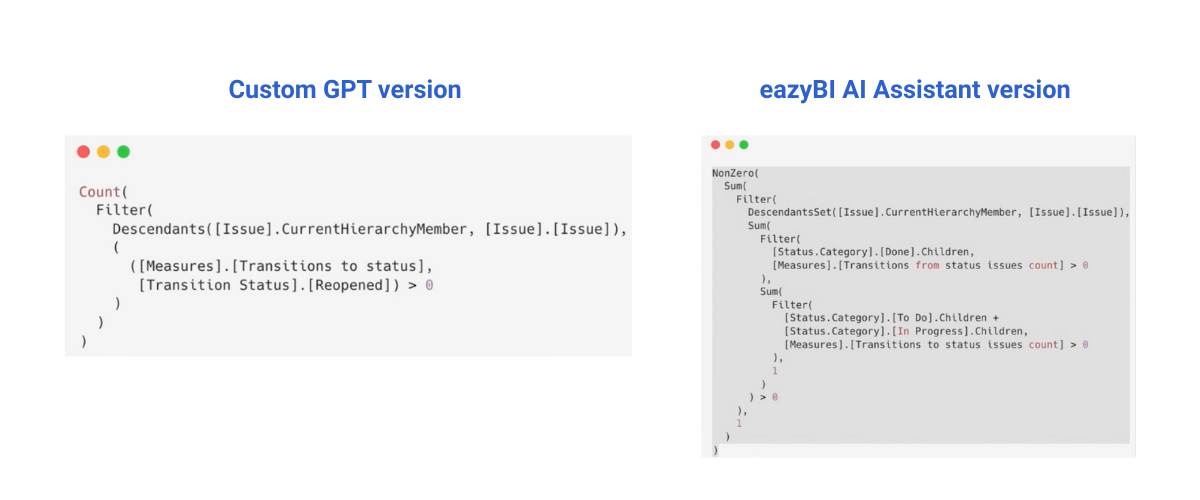
The real issue wasn’t with the tools, but with the prompt. The word “reopened” is vague and can mean different things depending on the workflow. For one team, it might mean a transition to a reopened status. For another, it might be tied to whether a resolution was cleared and then re-added.
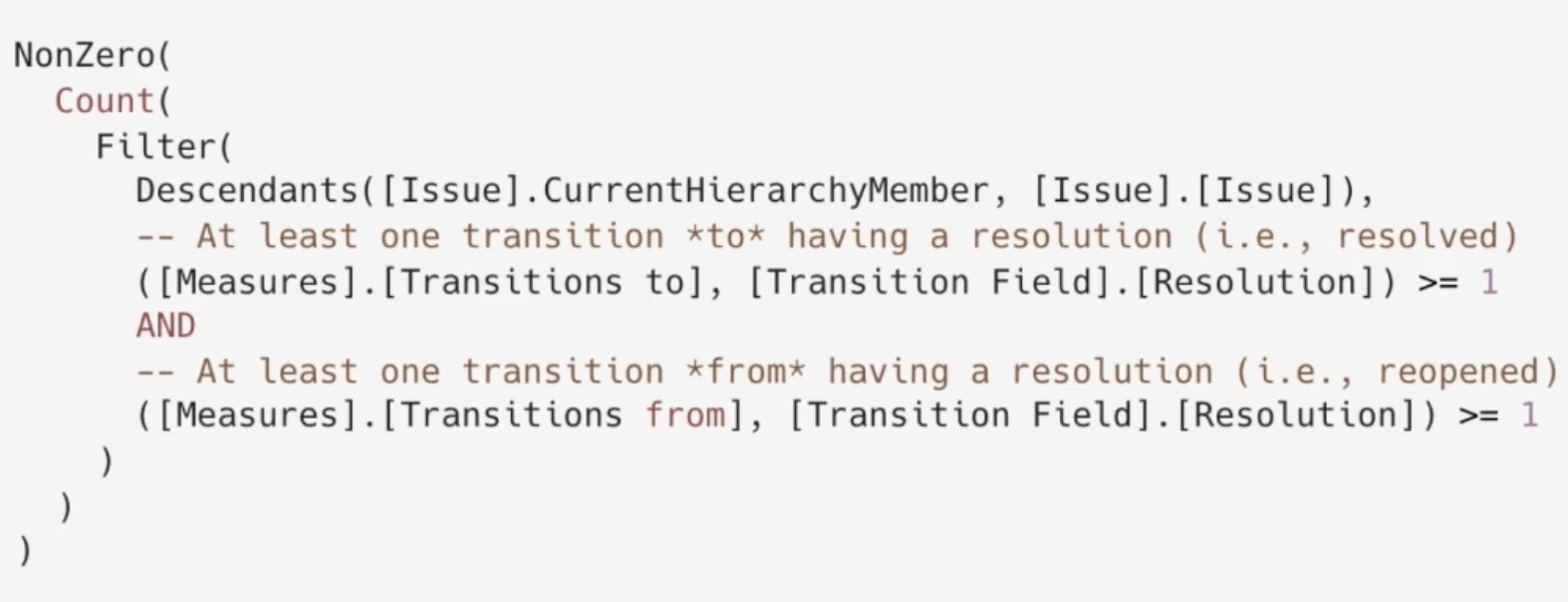
If a more precise prompt was provided – something like: “I want to create a calculated measure that counts issues that had at least one change to the Resolution field (i.e., were resolved at least once) and later had the Resolution field cleared (i.e., the issue was reopened). The logic should be based on the Resolution field transition, not status changes.” – The correct answer would have come much sooner.
Takeaways
Working with AI assistants is no longer about asking for code and hoping for the best. It’s about using them as a thinking partner, one that questions assumptions, challenges logic, and helps shape better solutions.
The key isn’t just feeding it prompts. It’s building context, asking the right questions, and guiding the conversation.
And whether you're using the built-in eazyBI Assistant or your own custom GPT, there’s one golden rule: don’t treat AI like a magic genie, treat it like a curious teammate.
Watch the full presentation recording here.